Movement and interaction
MOONBIT lists the movement keys below. The reviewed Windows footage also uses first-person camera aiming and shows a mouse icon over interactive objects, including doors, the sunflower painting and the rubber duck. For an object task, approach the correct target and follow that prompt rather than guessing a keyboard interaction.
| Input or cue | Use |
|---|---|
| W A S D | Move around the mat and house. Official mapping. |
| Space | Jump, including valid colour-pad and furniture commands. Official mapping. |
| C | Crouch; the reviewed hiding route goes under the kitchen table. Official mapping. |
| Camera aim | Face Suzy, the floor, ceiling, window or another named visual target. Observed in footage. |
| Mouse prompt on an object | Use the displayed interaction for a touch, pickup, door or placement task. Observed in footage. |
Sources: MOONBIT: official Suzy Says! listing; CatPlay: Suzy Says! playthrough
Which instructions count?
Suzy’s tutorial gives the central rule: act only when the instruction includes her name followed by “says.” A line such as jump-on-blue without that prefix is a trap during the command game. Wait for the next instruction instead of treating every spoken action as a task.
Listen through the line before starting. The tutorial deliberately mixes prefixed colour commands with an unprefixed one, then corrects the player. The same distinction continues with looking, crouching and later object commands. A noise or scare by itself is not a new spoken instruction.
Story objectives before the DVD starts, the phone event and the secret radio input belong to their own contexts. Do not use the regular-round rule to conclude that every objective elsewhere in the game must be prefixed.
Sources: CatPlay: Suzy Says! playthrough; RUSH PLAY: radio code and ending showcase
Search actions and objects
Search for the thing Suzy named, or for an action such as look, jump, touch or hide. Entries include the object’s room, what to do and a source position. They describe commands and routes visible in the reviewed playthrough rather than predict the next line of your game.
16 reference entries
Move
Use WASD to move through the house and position yourself on the mat.
Official control mapping.
Official control · MOONBITJump
Press Space. For a valid colour command, jump onto the named red, green, blue or yellow circle.
Check the prefix before acting. The tutorial demonstrates why an unprefixed colour instruction should be ignored.
Reviewed action · 1:48 in CatPlay’s videoCrouch down
Press C when the full command asks for crouching.
C is the official key. Crouching also lets the player move beneath the kitchen table during the recorded hide sequence.
Official control · MOONBITLook at me
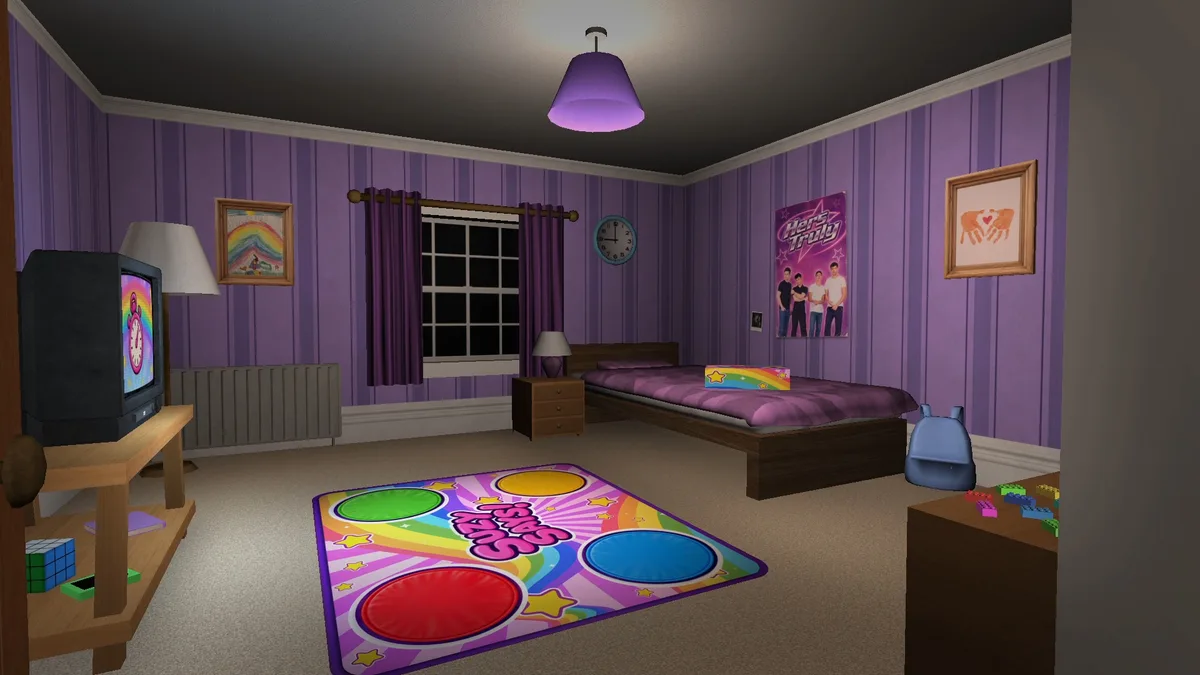
Face Suzy on the bedroom television when the command includes the required prefix.
The bedroom TV is the target, rather than the second television in the living room.
Reviewed action · 2:35 in CatPlay’s videoLook at the floor
Aim your view down towards the floor when this is a valid command.
The reference run also contains unprefixed floor instructions. Do not act just because the target is familiar.
Reviewed action · 8:42 in CatPlay’s videoLook at the ceiling
Aim up at the ceiling when the prefix makes the instruction valid.
This differs from crouching or looking at the floor.
Reviewed action · 14:06 in CatPlay’s videoLook at the window
Turn towards the bedroom window when the full command is valid.
Ignore an unprefixed version of the same line during regular command rounds.
Reviewed action · 6:09 in CatPlay’s videoLook behind you
Turn the camera to look behind your current position when instructed with the prefix.
A scare or sound by itself is not the complete command.
Reviewed action · 7:02 in CatPlay’s videoTouch or look at the sunflower painting
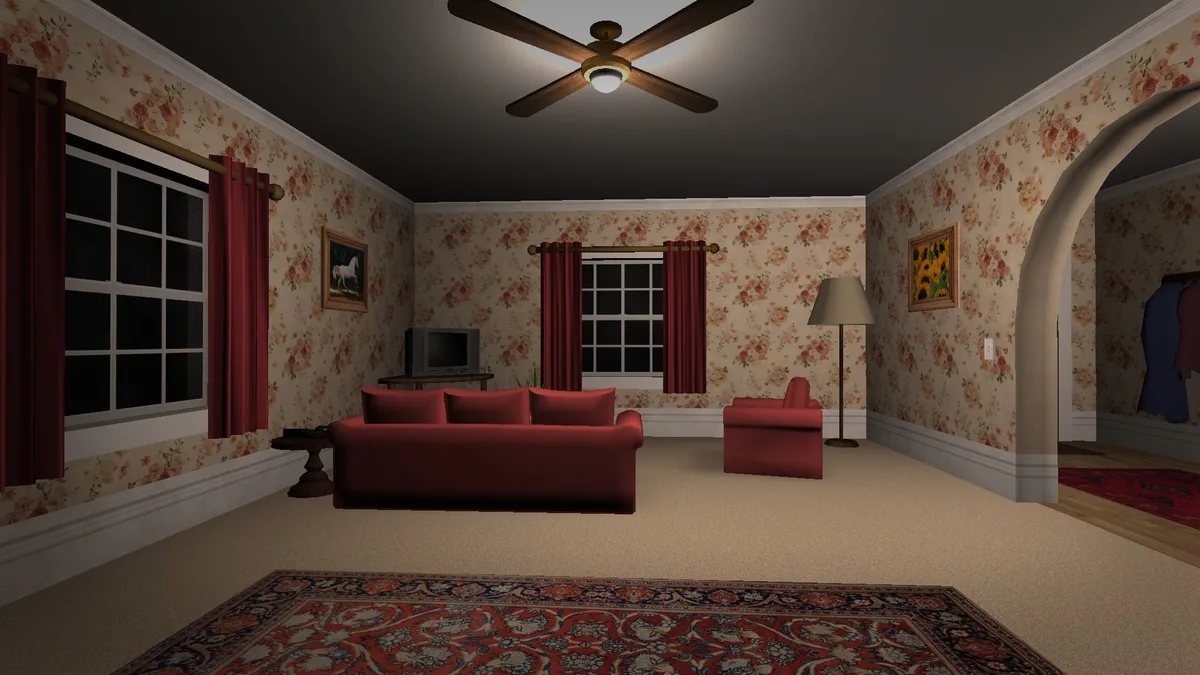
Find the framed yellow sunflowers in the living room near the red seating and floor lamp. For touch, approach and use its mouse prompt. For look, direct the view at the picture.
The first touch task is followed by praise and a return-to-mat instruction. Later rounds reuse the painting with a different verb.
Reviewed action · 3:34 in CatPlay’s videoTouch the rubber duck
Go to the bathroom and approach the small yellow duck on the bathtub rim. Use the mouse prompt, then return to the bedroom.
The recorded task does not carry the duck back to the mat.
Reviewed action · 4:50 in CatPlay’s videoLook at or touch the fridge drawing
Go into the checkerboard-floor kitchen. For look, face the drawing on the refrigerator door; for the later touch task, approach and use its mouse prompt.
The initial task uses look, while a later round uses touch. Follow the verb in your current line.
Reviewed action · 6:23 in CatPlay’s videoClose the front door
Find the open white exterior door beside the coat hooks and red hall runner. Use the door interaction to shut it, then return when Suzy calls.
This is the visitor event, not the brown bedroom door.
Reviewed action · 7:45 in CatPlay’s videoHide
The successful reference route goes to the kitchen dining table, crouches with C and waits underneath it until the search ends.
Suzy announces that the player was not found at about 11:38. One observed safe position does not establish all hiding rules.
Reviewed route · 10:30 in CatPlay’s videoJump on the couch
For a valid prefixed command, move to the red couch in the living room and jump onto it.
The command mix also contains an unprefixed couch instruction; do not execute that version.
Reviewed action · 13:58 in CatPlay’s videoJump on the bed
For a valid prefixed command, move to the purple bedroom bed and jump onto it.
This is a furniture target rather than one of the mat colours.
Reviewed action · 14:24 in CatPlay’s videoBring four candles
Check the hallway cabinet beside its lamp, the kitchen dining table, the living-room TV stand and the small bathroom table beside the toilet rolls. Carry each candle to a different mat circle and place it.
All four standing on the mat, followed by the symbols instruction, is the completion cue. The full walkthrough compares two successful placement orders.
Reviewed route · 15:16 in CatPlay’s videoSources: MOONBIT: official Suzy Says! listing; CatPlay: Suzy Says! playthrough
Look, touch, jump and bring
A look task is completed with the view directed at its target. Look-at-Suzy means the character on the bedroom TV; the directional tasks name the floor, ceiling, window or the area behind you. The early fridge task also uses looking. These should not all be collapsed into a generic click instruction.
A touch task uses a nearby object interaction. The sunflower picture in the living room and the duck on the bathroom tub show mouse prompts in the footage. Later, the fridge drawing also receives a touch instruction. The location may be familiar while the required action changes.
A jump task needs the named landing target: one of the coloured circles, the bedroom bed or the living-room couch. Bring-four-candles is different again: collect a candle, carry it to the mat and place it, repeating until all four circles hold one. A successful object trip is followed by a return instruction or the next story beat.
Read the complete instruction, including its prefix.
Separate the action word from the target object.
Follow the requested action. Looking and touching differ.
Look
Use the requested visual target.
Touch
Do not replace an interaction with a glance.
Sources: CatPlay: Suzy Says! playthrough
Learn these house landmarks
The purple bedroom is your base: it contains Suzy’s TV, the mat and the bed. The floral hallway connects it to the white front door and the living room. Red seating, a coffee table, the sunflower painting and a second TV distinguish the living room from the bedroom.
The kitchen opens from the living room and has a black-and-white checkerboard floor, a dining table and the fridge drawing. The bathroom is in the side corridor and contains a tub, toilet and yellow duck. Learning these landmarks during setup makes the later trips easier to follow.
For hiding, the recorded successful position is under the kitchen dining table. For candles, check the hallway cabinet, kitchen table, living-room TV stand and bathroom side table. The full walkthrough gives pickup times and delivery cues.
Sources: CatPlay: Suzy Says! playthrough; FusionZGamer: Suzy Says! playthrough
Why a copied script can fail
The reviewed runs share story errands but use different ordinary commands between them. CatPlay’s opening real round begins with a look-at-Suzy task; other recorded runs open differently. Use a video to understand an action and locate a story stage, not as a guaranteed sequence to execute from memory.
If the game marks an action wrong, note the complete line, including its prefix and verb, then compare the target and your action. This guide has not measured exact camera tolerance, deadline lengths or the command-selection algorithm. A repeated rejection after matching the line is useful evidence for a report, rather than proof that every such rejection has the same fix.
Sources: CatPlay: Suzy Says! playthrough; RUSH PLAY: radio code and ending showcase
Sources & evidence
Checked 15 November 2026. Game build numbers were not verified. No hands-on game testing is claimed. Video evidence means transcript and task-sequence frame review, not continuous viewing of every run.
- MOONBIT: official Suzy Says! listingDeveloper
- CatPlay: Suzy Says! playthroughGameplay video; transcript and task-sequence frames reviewed
- FusionZGamer: Suzy Says! playthroughGameplay video; transcript and task-sequence frames reviewed
- RUSH PLAY: radio code and ending showcaseGameplay video; transcript and task-sequence frames reviewed